If you wanted one short answer, it would be this: Pick Nameberry for deeper name info and NameHatch for faster shared matches.
Choosing a baby name as a couple often gets stuck on the same issues: style, meaning, family input, and how common a name feels. This comparison comes down to four things: how you find names, how you match with a partner, what filters you get, and what you pay.
Here’s the article in plain English:
- Nameberry is better if I want to read up on a name before I save it
- NameHatch is better if I want to swipe and find overlap fast
- Nameberry includes deep name details, origin, meaning, and U.S. popularity data
- NameHatch keeps the process simple with browser-based swiping and live match alerts
- Nameberry starts free, with about $4.99 for unlimited swipes in the app
- NameHatch has a $0 plan, a $3/month plan, and a $12/6-month plan
- A BabyCenter-cited survey says 25% of expecting moms feel pressure to consider a baby name they do not like
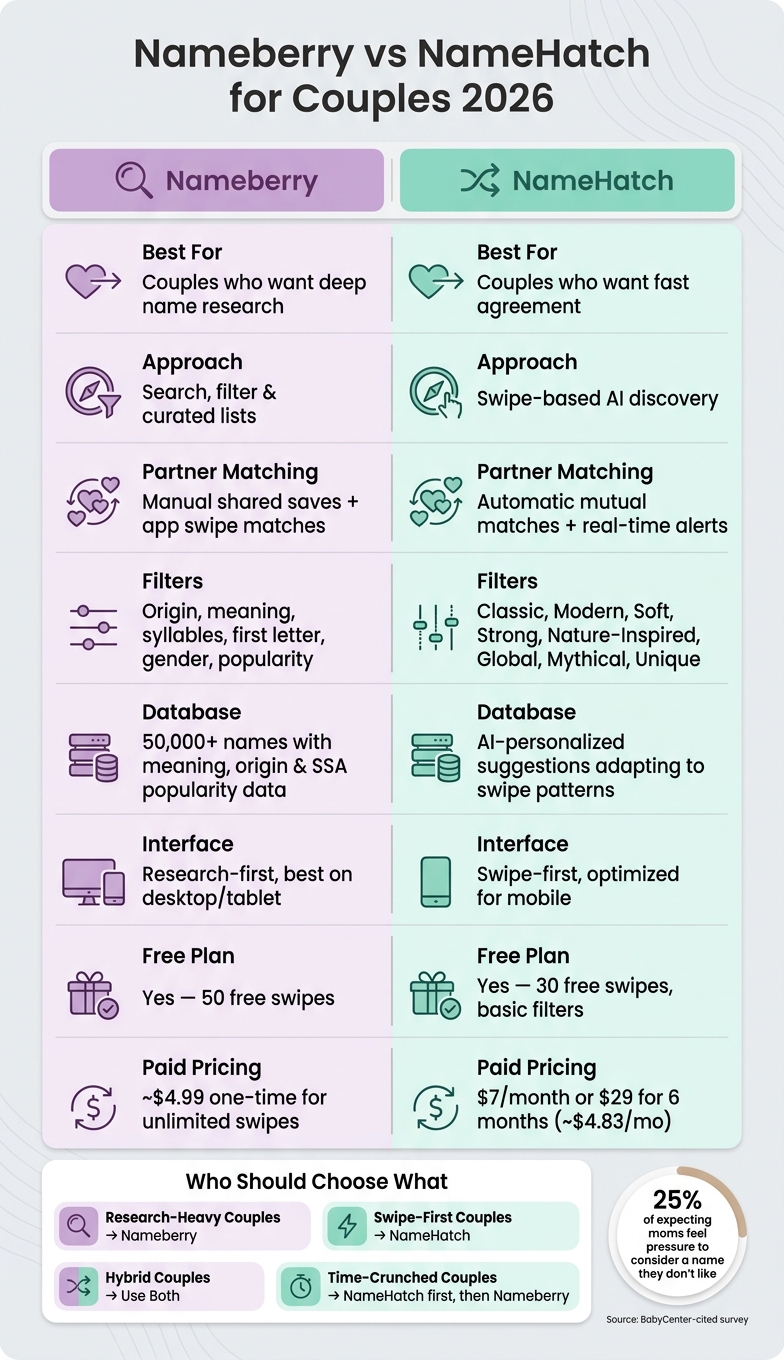
Nameberry vs NameHatch: Baby Name App Comparison for Couples 2026
Quick Comparison
| What matters | Nameberry | NameHatch |
|---|---|---|
| Best for | Couples who want more name context | Couples who want fast agreement |
| Main approach | Research and shortlist building to narrow your list | Swipe-based matching |
| Partner matching | Shared saves and app matches | Automatic mutual matches |
| Filters | Origin, meaning, syllables, first letter, gender, popularity | Style-based filters like Classic, Modern, Soft, Strong |
| Extra data | U.S. SSA popularity and name background | AI-led suggestions and live match alerts |
| Free access | Yes | Yes |
| Paid access | About $4.99 one-time for unlimited app swipes | $3/month or $12 for 6 months |
Bottom line: if you want to study names first, go with Nameberry. if you want to cut down the back-and-forth, go with this NameHatch alternative for couples.
sbb-itb-f13f980
Nameberry for Couples: Research, Filters, and Shared Matches
Nameberry is a good fit for couples who want to learn about a name before they rank it. The platform is built around a curated database of more than 50,000 names, along with hundreds of themed lists. Each name entry includes meaning, origin, popularity data, history, nicknames, and similar-name suggestions.
That extra detail matters when two people care about more than just how a name sounds. If you're weighing meaning, family background, or whether a name feels overused, Nameberry gives you more to work with. It gets even more useful once you start trimming the list with filters and shared saves.
Nameberry's Search and Filter Tools for Building a Shared Shortlist
Nameberry's search tools let couples filter names by origin, meaning, syllable count, first letter, gender, and popularity range. Popularity data comes from the official U.S. Social Security Administration (SSA) Top 1,000 and from Nameberry's own rankings, which are based on site pageviews and user favorites. That second data source can bring up names before they show up in national birth records.
In plain terms, this helps couples figure out how common - or how off the beaten path - they want a name to feel.
A simple way to use it:
- Start with shared filters like origin, syllable count, or popularity
- Save separate shortlists
- Compare where your picks overlap
Once you've done that, the app can take those preferences and turn them into side-by-side matching.
How Nameberry's App Supports Partner Swiping and Matched Lists
The Nameberry app uses a swipe-based setup for couples, with each partner swiping on their own device. Each person swipes in private, so no one sees the other's picks in real time. As you keep swiping, the algorithm learns each person's style and adjusts later suggestions.
The app then builds a shared matches list automatically. These are the names both partners swiped right on. It also adds joint style analysis. That's helpful because it can point out patterns you may not have noticed on your own, like a shared pull toward vintage names, certain first letters, specific syllable counts, or names from the same origin group.
Instead of turning name picking into a back-and-forth argument, it gives you a shortlist built from names you both already liked. Paid plans also support unlimited partners, so all feedback stays in one place.
The app begins with 50 free swipes. After that, there's a one-time upgrade of about $4.99 for unlimited swipes, favorites, and partner connections.
Who Should Use Nameberry as a Couple
Nameberry works best for couples who want deep name research, trend data, and a slower pace for making decisions. It's a strong pick if you want to narrow the field before talking through final choices. A practical approach is to use the site for research and the app for shared sorting.
If you want a faster path to agreement through swiping alone, the next platform takes a different approach.
NameHatch for Couples: Swipe-Based Matching and Faster Agreement
NameHatch is built for couples who want to agree faster by swiping, not by doing deep research. It runs in a web browser, so there’s nothing to download. Both partners open it separately and swipe on names on their own. That makes NameHatch the faster, swipe-first pick for couples who want alignment before they start talking through every option.
How NameHatch's AI and Filters Shape Name Discovery
The setup works like a swipe-based decision tool: swipe right if you like a name, swipe left if you want to pass. NameHatch uses AI to tailor suggestions based on style, origin, and feel.
The filters help narrow the list from the start. Standard filters include Most Popular, Classic, Modern, Soft, and Strong. Premium adds Nature-Inspired, Global, Mythical, and Unique. It’s also ad-free, which keeps the swiping smooth and uninterrupted. In plain terms, the filters shrink the pool early, and partner sync turns that smaller set into shared matches.
How Partner Sync and Real-Time Matches Help Couples Agree
Each partner swipes in private. When both people like the same name, NameHatch adds it to a shared match list and sends a real-time alert.
That setup can take some pressure out of the naming process. Instead of debating each name one by one, couples can spend time on the names that already have mutual interest. The result is a shared shortlist that’s simple to revisit later.
NameHatch Pricing and Who It Fits Best
NameHatch offers three plans:
| Plan | Price | Best For |
|---|---|---|
| Free | $0/month | Couples just starting out, 30 swipes, basic filters |
| Premium Monthly | $3/month | Short-term use, full features with flexibility |
| Premium 6-Month | $12 for 6 months | Extended collaboration across a full pregnancy |
The Free plan is a solid starting point if you want to try the workflow before paying. It includes 30 swipes and basic filters, which is enough to see how the matching system feels in practice. The Premium Monthly plan at $3/month works well if you want full access for a short stretch. The Premium 6-Month plan costs $12, and fits couples who want full access through an entire pregnancy. Those plan differences matter most when you compare speed, flexibility, and how much direction each couple wants.
Nameberry vs NameHatch: Side-by-Side Comparison for Couples in 2026
Feature Comparison Table: Matching, Filters, Shortlists, Pricing, and Ease of Use
Now that both tools are on the table, this side-by-side view makes the choice a lot simpler. The main split is pretty clear: Nameberry leans research-first, while NameHatch leans swipe-first.
| Feature | Nameberry | NameHatch |
|---|---|---|
| Discovery approach | Search and curated lists | Swipe-based AI discovery |
| Matching method | Manual partner comparison | Automatic mutual matches |
| Filters | Origin, meaning, style, popularity, and U.S. SSA ranking | Style filters like Most Popular, Classic, Modern, Soft, and Strong, plus premium filters like Nature-Inspired, Global, Mythical, and Unique |
| AI suggestions | Guided by trend data and editorial lists | Personalized suggestions that adapt to each partner's swipe pattern |
| Shortlist building | Saved lists with notes and manual curation | Auto-generated from mutual matches |
| Resolving disagreements | Discuss differences from shared lists | Mutual matches keep debate focused |
| Interface flow | Research-first, best on desktop or tablet | Swipe-first, optimized for short mobile sessions |
| Cross-device use | Web and mobile web | Mobile and desktop with real-time sync |
| Pricing (USD) | Free with ads; premium pricing varies | Free with 30 swipes; $3/month or $12 for 6 months |
A lot comes down to how you make decisions as a couple.
Which Platform Works Better for Different Couple Situations
If you like to research before making a call, Nameberry is the better place to start. It gives couples more background on each name, which can make the whole process feel less random. One partner can put together a researched shortlist, and the other can go through it and mark favorites.
If speed matters more than deep reading, NameHatch has the edge. It works well when you want to find overlap fast instead of talking through a huge list of maybes. Put simply: choose NameHatch for quick agreement, and choose Nameberry for deeper name research before deciding.
If you're after unique or themed names, both tools can help, but they do it in different ways. Nameberry uses editorial lists built around themes like vintage revivals, nature names, and mythological picks. Its filters and name pages also help couples check popularity and U.S. rankings. NameHatch, on the other hand, uses premium filters like Mythical, Nature-Inspired, and Global to narrow the swipe stream to a certain style. That setup is faster, but it gives you less detail.
Those trade-offs set up the final pick by couple type.
Conclusion: Which Baby Name Tool Is Better for Couples in 2026?
After comparing the features, the choice comes down to how you want to decide as a couple. One tool leans toward deeper research. The other is built to help you reach agreement with less back-and-forth. Nameberry is the better fit when depth matters. NameHatch helps couples find shared picks faster because the whole setup starts with swiping.
Here’s the simplest way to choose:
- Research-heavy couples who want context on name origins, baby name popularity rankings, and background will likely feel more at home on Nameberry. It works well when you want context before making a pick.
- Swipe-first couples who want fast, low-friction decisions should head straight to NameHatch. Connect, swipe, and let mutual matches shrink the list.
- Hybrid couples - where one partner loves data and the other goes with gut instinct - can use Nameberry for research and NameHatch to find fast overlap.
- Time-crunched couples with a due date coming up should lean on NameHatch to pick baby names without arguing, then use Nameberry for a final check on meaning and popularity.
Use Nameberry to explore; use NameHatch to agree.
FAQs
Which one is easier for indecisive couples?
NameHatch is built for indecisive couples who get stuck in the usual baby-name spiral. Instead of scrolling through long lists and second-guessing every option, you can move through names with less friction and less decision fatigue.
The swipe-based interface makes that process feel simple. As you go, it automatically shows mutual matches, so you don't have to compare notes or dig through separate favorites lists later.
On top of that, AI suggestions and smart filters help narrow the field fast. And because the app is ad-free, couples can stay focused on one thing: building a clear shortlist together.
Can we use both tools together effectively?
Yes. NameHatch works best as a shared, swipe-based tool that helps turn broad inspiration into a shortlist you can agree on.
You can use research-focused sites to gather early ideas, then move to NameHatch to sync accounts, compare what each person likes, and make joint picks without spreadsheets or screenshots.
Which platform is better for unique baby names?
NameHatch stands out for finding baby names that feel a bit different. It uses AI-based personalization and advanced filters to learn what you like, then serves up name ideas that fit your style.
If you have Premium, you can dig into categories like Unique, Nature-Inspired, Global, and Mythical. Pair that with the swipe-to-match setup, and the whole process feels a lot easier - especially if two partners are trying to stay on the same page while looking for distinctive names.