If you have 30 to 50 baby names, don’t compare them all at once. Filter them in order. I’d start with trend, then meaning, then popularity, then full-name flow, and last, initials. That cuts weak options early and makes the final choice much less messy.
Here’s the short version:
- Start with a shared list so both parents are working from the same names
- Check trend data first to spot names that are spiking or fading
- Review meaning and origin to rule out names that don’t fit your family
- Look at current popularity to see if a name feels too common or too rare
- Test the full name out loud with middle and last name
- Check initials last to avoid awkward letter combinations
In the U.S., the article points to SSA birth data as the base for trend and popularity checks. That matters because it gives you a fact-based way to sort names instead of going by gut alone.
Quick Comparison
| Tool | What I’d use it for | Best stage |
|---|---|---|
| Trend Analyzer | See if a name is going up, flat, or down | First pass |
| Meaning Finder | Check meaning, origin, and family fit | After trend check |
| Popularity Calculator | See how common the name is now | Mid-filter |
| Compatibility Checker | Test first, middle, and last name flow | Final 5 to 10 |
| Initials Matcher | Catch awkward initials or acronyms | Final step |
The main idea is simple: use tools to cut names, not pick one for you. Once a name passes all five checks and still sounds right for a baby, kid, teen, and adult, you’re close to your answer.
sbb-itb-f13f980
Filter the Long List With Trend, Meaning, and Popularity Tools
With your shared list ready, use these three tools to cut names that feel too trendy, too common, or just off for your family. Start with trend data first, because that usually trims the list the fastest.
Use the Baby Name Trend Analyzer to Spot Rising or Falling Names
Use the Baby Name Trend Analyzer to see whether a name is rising, stable, or falling, so you can remove weak fits early.
That one step can save a lot of time. A name may sound great at first, but if it feels tied to a short-lived spike, it may not belong on your final list.
Then check meaning to cut names that clash with your values or family background.
Use the Baby Name Meaning Finder to Check Meaning and Origin
Use the Baby Name Heritage Finder to check meaning, origin, and cultural fit before a name makes the shortlist.
This is where a name can shift from “nice” to “not for us” pretty fast. Sometimes the sound works, but the background or meaning doesn’t line up with what you want.
After that, check popularity to see how common the remaining names are.
Use the Baby Name Popularity Calculator to See How Common a Name Is
Use the Baby Name Popularity Calculator to see how common a name is right now and whether that fits how common you want it to feel.
Some families want a name everyone knows. Others want something less used but not hard to say or spell. This tool helps you spot that sweet spot without guessing.
Once those three filters are done, move to full-name and initials checks.
Stress-Test the Shortlist With Compatibility and Initials Checks
Once you’ve cut the long list down, do two quick checks. They help you catch the kind of issues that don’t stand out on paper but jump out the second you say the full name aloud.
Use the Baby Name Compatibility Checker to Test Full-Name Flow
Use the Baby Name Compatibility Checker when you have 5 to 10 finalists. It helps you test how the first, middle, and last names sound together and how the name fits with the sibling set.
This step is simple, but it can save you from a name that looks good by itself and feels clunky as a full name. If the full name still sounds strong, move on to the initials check.
Use the Baby Name Initials Matcher to Catch Awkward Initial Combinations
Use the Baby Name Initials Matcher once you have finalists. It helps you catch awkward initials before you commit - the kind that accidentally spell a word, common slang, or a recognizable acronym on monograms and school forms.
Put All Five Tools Into One Decision Workflow
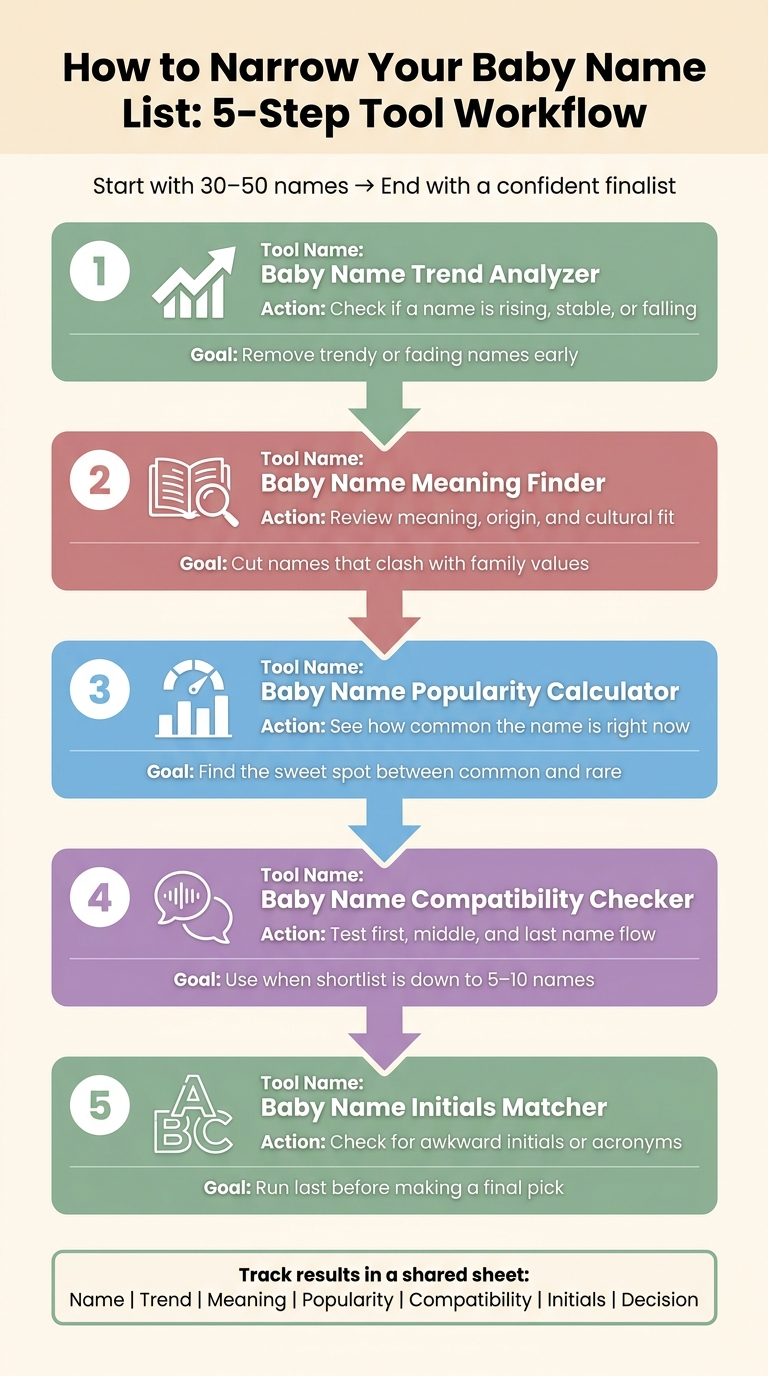
How to Narrow Your Baby Name List: 5-Step Tool Workflow
Use the five tools in the same sequence each time. That keeps the process clean and makes it much easier to compare names without doubling back.
A Simple Order for Narrowing 30 to 50 Names Down to Finalists
Begin with a shared list of 30 to 50 names. Then run them through the tools in this order:
- Baby Name Trend Analyzer - Check this first to see if a name is moving up or down.
- Baby Name Meaning Finder - Next, look at meaning and origin before a name makes the shortlist.
- Baby Name Popularity Calculator - Use this to remove names that feel too common or too uncommon for your taste.
- Baby Name Compatibility Checker - Once you have a shortlist, test how each full name sounds together.
- Baby Name Initials Matcher - Run this last to spot awkward initials before you make a final pick.
By the end, you should be left with a small group of names that are worth looking at side by side.
How to Compare Results Without Getting Stuck
After the first pass, compare only the names that make it through every filter. At that point, put all the results in one place so you don't have notes scattered everywhere.
A simple shared sheet works well. Track each name with columns for Name, Trend, Meaning, Popularity, Compatibility, Initials, and Decision.
If the results point in different directions, set your priority order before you start comparing. That way, you're not debating every name from scratch.
With the shortlist in place, the last step is picking the name that feels like the best fit.
Choose the Best Name With More Confidence
When your shortlist is down to a few names, do one last review to weed out the weak ones. No single tool should pick the name for you. Each one just clears up a different kind of doubt.
A simple way to go is this: start with trend and meaning, then check popularity, sound, and initials.
Baby Name Trend Analyzer
Use the Baby Name Trend Analyzer to see where a name is headed before you put it on the final list. That way, you can tell whether it's rising, steady, or starting to fade - and whether that sits well with you.
Baby Name Meaning Finder
Use the Baby Name Meaning Finder to double-check that the name's meaning and origin still feel right once you're close to making the call.
Baby Name Popularity Calculator
Use the Baby Name Popularity Calculator to check whether the name lands at the right point between common and uncommon for your family.
Baby Name Compatibility Checker
Use the Baby Name Compatibility Checker to make sure the full name still sounds good when you say it out loud with the last name.
Baby Name Initials Matcher
Use the Baby Name Initials Matcher to spot any awkward initials before anything is set.
The tools catch possible issues. You make the call.
If a name clears each check and still feels right for a baby, a kid, a teen, and an adult, it's ready for the final decision.
FAQs
What if we disagree on which names to cut first?
If you don’t agree on which names to cut first, take a simple, structured path. It helps turn a back-and-forth into something you can actually judge.
- Use the Baby Name Trend Analyzer to check whether a name is going up or down.
- Try the Baby Name Meaning Finder and Baby Name Initials Matcher to compare meaning and flow.
- Once you have a shortlist, use the Baby Name Compatibility Checker. Then rank your favorites from 1 to 5 or compare names head-to-head.
How many names should make the final shortlist?
Aim for a final shortlist of 5 to 10 names. Once you’ve narrowed it down, each partner can rank their top picks in that group and see where your choices line up.
Stuck between two names? Put them head-to-head. You can also score each one from 1 to 5 to make the decision a little easier and spot which option feels like the better fit.
Can these tools help if we want a name that feels unique but not too unusual?
Yes. These tools help you find that sweet spot.
Use the Trend Analyzer to see how a name's popularity has changed over time. Try the Meaning Finder if you want names tied to something personal. And browse themed collections when you want options that stand out a bit but still feel familiar.
Put together, they can help you land on a name that feels special without sounding out of place.