Choosing a baby name can be stressful, but apps like NameHatch and Kinder offer solutions to make the process easier for couples. While both apps help you and your partner collaborate, NameHatch stands out with features like AI-powered name suggestions, desktop and mobile compatibility, and an ad-free experience. Kinder, on the other hand, is mobile-only, simpler, and more budget-friendly but lacks advanced features and can have syncing issues.
Key Differences:
- NameHatch: AI personalization, works on both desktop and mobile, ad-free, and offers plans starting at $3/month or $12 for six months.
- Kinder: Mobile-only, basic filters, free to start with optional purchases for name sets ($0.99–$4.99).
Both apps allow couples to privately swipe on names and create a shared shortlist when they match. If you want advanced features and cross-device access, NameHatch is the better choice. If you prefer a simpler, low-cost option, Kinder might work for you.
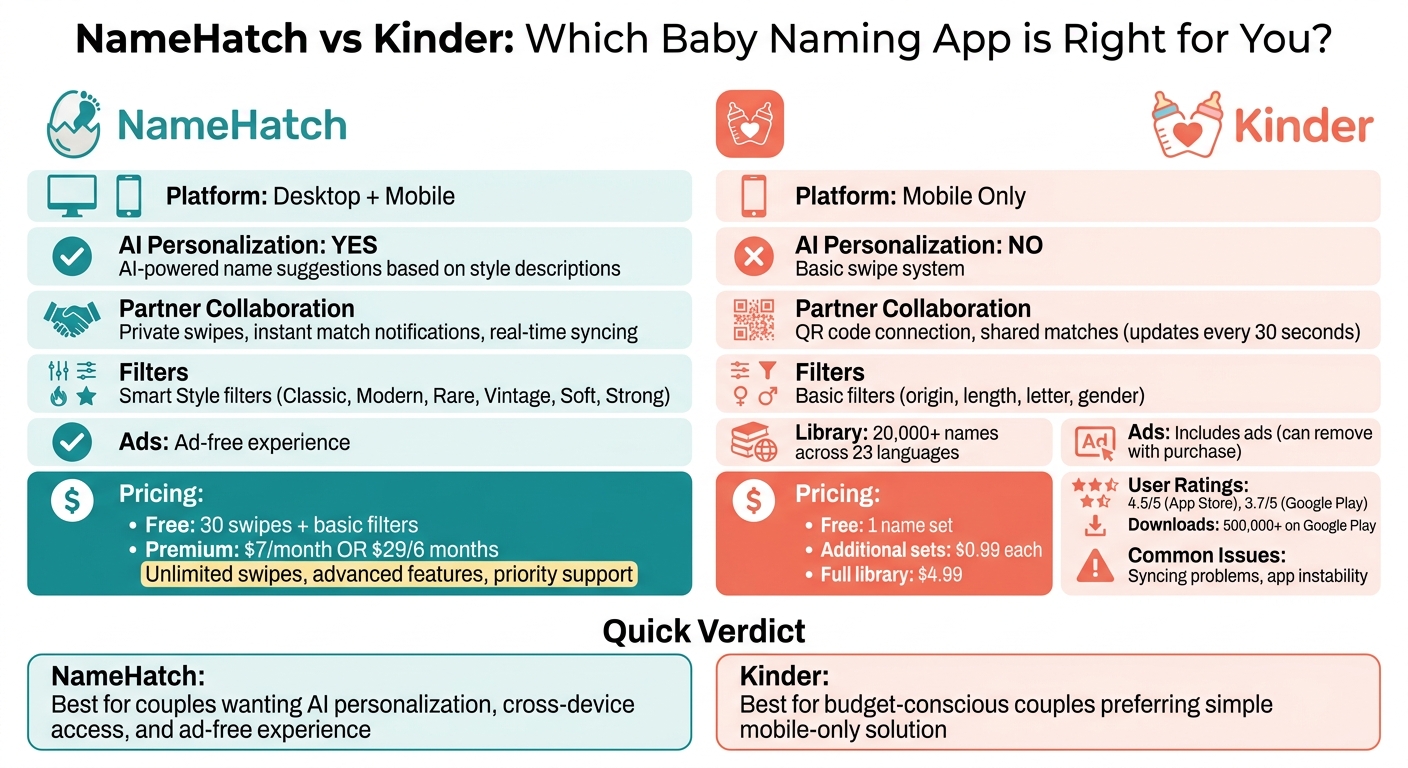
NameHatch vs Kinder: Feature and Pricing Comparison for Couples
1. NameHatch
Partner Collaboration
NameHatch makes navigating partner preferences easy, eliminating awkward baby name disagreements. Each person swipes privately, allowing for honest, first impressions. When both partners "like" the same name, the app notifies you of a match and adds it to a shared shortlist - simple and stress-free.
You can start a session with your partner whenever it’s convenient, and all your selections sync instantly across devices. Whether you're browsing names on your desktop during a lunch break or your partner is swiping on the couch with their phone, NameHatch works seamlessly on both desktop and mobile. This flexibility means you’re not tied to one device or stuck sharing a single screen.
To take it a step further, NameHatch’s AI technology fine-tunes suggestions to make the process even smoother.
AI Personalization
The AI-powered suggestion engine is a game-changer for couples facing decision paralysis. Instead of wading through endless lists of names, you can describe your ideal style in plain language - whether it’s "modern and trendy" or "classic with a twist" - and the AI will generate tailored options that fit your vision.
Smart filters and themed collections make it easy to zero in on your preferences. Whether you’re drawn to Classic, Modern, Soft, Strong, or even rare vintage names inspired by nature or mythology, NameHatch has you covered.
Pricing
NameHatch keeps things straightforward when it comes to pricing.
- Free plan: Includes 30 swipes and basic filters.
- Premium plan: For $3/month or a one-time 6-month payment of $12, you get unlimited swipes, favorites, advanced features, priority support, and an ad-free experience.
With options for every budget, NameHatch ensures you can focus on finding the perfect name without breaking the bank.
sbb-itb-f13f980
2. Kinder
Kinder takes a more traditional swipe-based approach to baby name selection.
Partner Collaboration
The app uses a Tinder-style swipe system tailored for naming babies. After connecting with your partner using a QR code or connection code, you can swipe right to like a name or left to pass on it. When both partners swipe right on the same name, it’s added to a shared matches list, which updates every 30 seconds. If one partner makes a purchase, the name set becomes available for both users. However, Kinder is only available on mobile devices. This setup helps couples collaborate and make decisions together.
Filters and Features
Kinder goes beyond swiping by offering a variety of filters to refine your search. Its library includes over 20,000 names across 23 languages. You can filter names by gender, starting letter, length, origin, or style. Additionally, the app allows you to add custom names to see how your partner responds. However, it lacks features like name meanings, origins, or pronunciation guides. Founder Krijn Haasnoot explains the app’s purpose:
I don't think Kinder is the end solution to choose the name for your child, I just hope to inspire, get the discussion going in a positive way and help out!
These tools encourage couples to explore options and spark meaningful discussions about potential names.
Pricing
Kinder is free to download and includes one name set tailored to your location . Additional name sets cost $0.99 each, while unlocking the entire library is $4.99. Any in-app purchase also removes ads . With over 500,000 downloads on Google Play, the app has gained a decent following. User reviews are mixed, with a 4.5/5 rating on the App Store and 3.7/5 on Google Play. Common complaints include syncing problems and the lack of detailed name information . The pricing structure offers flexibility, allowing couples to choose options that fit their needs and budget.
Pros and Cons
When it comes to collaborative baby-naming tools, each app has its own way of catering to couples' preferences. Here's a closer look at the strengths and drawbacks of two popular options, NameHatch and Kinder, to help you decide which one fits your needs.
NameHatch stands out with its AI-driven name suggestions, syncing across both mobile and desktop, an ad-free environment, and straightforward pricing options: free, $3 per month, or $12 for six months. However, the free plan limits you to just 30 swipes, which might feel restrictive.
Kinder, on the other hand, offers a budget-friendly entry point. It provides one free name set, with additional sets priced at $1.99 each or a full bundle for $7.99. While affordable, it’s only available on mobile, includes ads, and has been reported to experience syncing issues and occasional app instability. Some users even had to delete and reinstall the app to restore purchases.
For a quick snapshot, here’s how the two compare:
| Feature | NameHatch | Kinder |
|---|---|---|
| Partner Collaboration | Mobile and desktop syncing; private match alerts | Mobile only; ad-supported experience |
| AI Personalization | based on style and descriptions | Not available |
| Filters | Smart Style (Classic, Modern, Rare, Vintage) | Basic filters by origin, length, and letter |
| Pricing | Flat pricing: $0, $3/mo, or $12/6-mo | Free base + $1.99 per set or $7.99 bundle |
| Ads | No ads | Includes ads |
Ultimately, the right choice depends on whether you value advanced personalization and cross-device syncing or prefer a simpler, more affordable mobile solution.
Conclusion
NameHatch reimagines the baby-naming process with its collaborative, AI-driven features. Designed for both mobile and desktop, the platform ensures a smooth, ad-free experience.
With its user-friendly interface, NameHatch offers tailored name suggestions based on your preferences. Whether you're drawn to styles like Soft, Strong, Vintage, or Modern, the AI vs. traditional naming methods help you find names that match your vibe. Plus, real-time match notifications keep both partners updated, making it easier to build a shared shortlist without missing a beat.
You can start exploring NameHatch’s features with the free plan, getting a feel for its collaborative tools. For those who want more, premium plans are available at $3 per month or $12 for six months, offering unlimited swipes and advanced filters - no hidden fees included.
FAQs
How does NameHatch help couples agree faster on a baby name?
NameHatch streamlines the baby-naming journey with its intuitive, AI-driven platform. Couples can swipe through names privately, share their favorites, and receive personalized suggestions that align with their preferences. The Partner Match Alerts feature notifies both partners when they agree on a name, while smart filters and AI-generated recommendations refine options based on style, background, and individual preferences. It’s designed to make choosing a name simple, fun, and free of stress.
Can we use NameHatch on both a laptop and our phones?
Yes, NameHatch is designed to work effortlessly across both laptops and phones. You can swipe, match, and collaborate with your partner on any device - whether you're on a desktop or using your mobile.
What do we get with NameHatch Premium compared to the free plan?
NameHatch Premium provides unlimited swipes, advanced filters, and full access to all features for just $3 per month or $12 for six months. On the other hand, the free plan limits you to 30 daily swipes and only includes basic filters.