If you want more filters tied to origin, meaning, or first letter, pick Baby Name Matcher. If I want to reach a shared shortlist with my partner in less time, pick NameHatch**.**
Here’s the short version:
- Baby Name Matcher (The Bump) focuses on browsing, swiping, saving, and then comparing picks later.
- NameHatch focuses on AI-led suggestions, partner sync, and automatic mutual matches.
- The main split is simple: one tool helps me search names by details, while the other helps me find overlap with my partner.
- Price is also a factor: NameHatch has a free plan with 30 swipes, then paid plans at $3/month or $12 for 6 months.
- Time matters: the article puts shortlist time at about 15–25 hours for The Bump vs 2–4 hours for NameHatch.
If I’m naming with a partner, the best pick depends on one question: do I want tighter manual control, or do I want the app to cut down the list for us?
Quick Comparison
| Criteria | Baby Name Matcher (The Bump) | NameHatch |
|---|---|---|
| Main approach | Browse, swipe, save | Swipe, match, shortlist |
| Filters | Gender, origin, meaning, letter | Style filters plus AI suggestions |
| Partner use | Separate swiping, then compare | Separate swiping with auto shared matches |
| Shortlist building | More manual | More automatic |
| Price shown | Not listed here | Free, $3/month, or $12/6 months |
| Best for | People who want more hands-on filtering | Couples who want a shortlist in less time |
For me, that’s the whole decision in one glance: The Bump is more search-first, while NameHatch is more match-first.
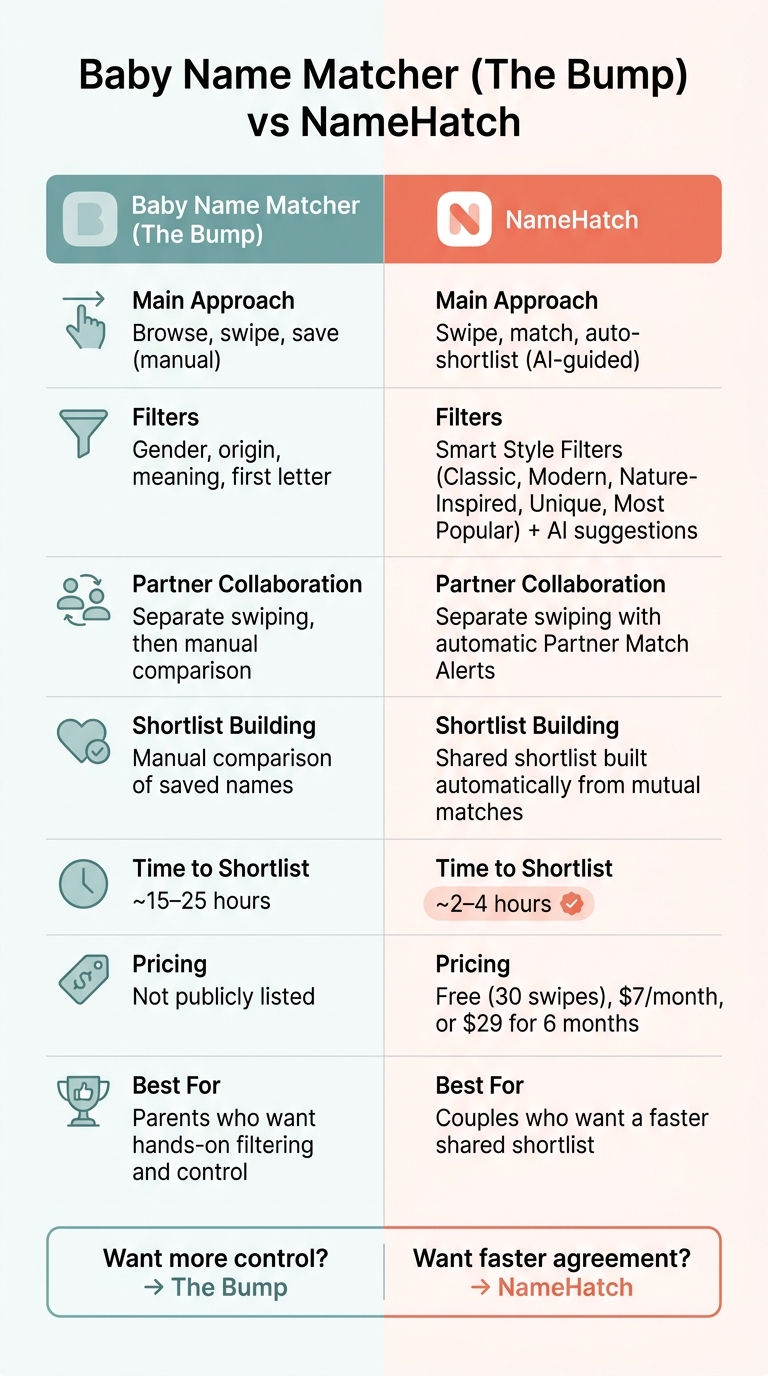
Baby Name Matcher vs NameHatch: Side-by-Side Comparison
Baby Name Matcher (The Bump): How It Works and How Couples Use It
Baby Name Matcher sits inside The Bump’s larger pregnancy platform, which makes the whole thing feel pretty easy to use. The setup is simple: swipe, filter, and save.
Swipe Flow, Filters, and Name Suggestions
You can sort names by gender preference: boy, girl, or neutral. Then it works like a swipe app. Swipe right if you like a name, and left if you want to pass. Each card includes the name’s meaning and origin, so you can get the basic context before making a call. After a few swipes, the app starts adjusting its suggestions based on baby name analytics and what you seem to like.
Partner Matching and Saving Favorites
Couples can link their accounts and swipe on their own devices, separately. When both people are done, the app shows the names they both liked. That gives couples a shared starting point instead of a blank page, which can make those early name talks a lot less frustrating.
sbb-itb-f13f980
NameHatch: How It Works and How Couples Use It
NameHatch adds AI-guided shortlist building to the baby-name search. It’s an AI-powered, ad-free web app that works on mobile and desktop, so neither partner has to download a mobile app. That shifts the process away from endless scrolling and toward narrowing down names that fit both people.
AI Suggestions, Style Filters, and Shortlist Building
The setup is simple: swipe right to save a name and left to skip it. The AI changes its suggestions based on what you tell it. If you describe your style, the tool starts showing names that match it.
You can also tighten the search with Smart Style Filters like Most Popular, Classic, Modern, Nature-Inspired, and Unique. Starting with a filter can save time. Instead of reacting to random names, couples can first get on the same page about the kind of names they want.
NameHatch also includes a few extra tools that help when a shortlist starts taking shape:
- Baby Name Initials Matcher
- Trend Analyzer
- Compatibility Checker
The initials matcher is especially handy for catching awkward first-name-and-last-name combinations before they become a problem.
Once the pool gets smaller, shared matching helps both partners stay in sync without having to compare separate lists by hand.
Partner Sync, Shared Matches, and Pricing
Partners swipe on their own devices, separately. When both people like the same name, NameHatch sends a Partner Match Alert and adds that name to a shared shortlist on its own.
Here’s how pricing and features break down:
| Plan | Price | Swipes | Key Access |
|---|---|---|---|
| Free | $0/month | 30 swipes | Basic filters, limited favorites |
| Premium Monthly | $3/month | Unlimited swipes | Premium filters, unlimited favorites, full access to shared matches |
| Premium 6-Month | $12/6 months | Unlimited swipes | All premium features, priority support |
That mix of AI, shared matches, and pricing sets up the side-by-side comparison below.
Baby Name Matcher (The Bump) vs NameHatch: Side-by-Side Comparison
The gap between these two tools gets much clearer once both partners start cutting down the list. The Bump leans on manual browsing and side-by-side comparison. NameHatch is built around swipe-to-match decisions. That one difference changes a lot: how fast couples can make choices, how the shortlist comes together, and how easy it is for both people to stay on the same page.
Comparison Table: Features, Collaboration, and Shortlist Tools
| Feature | Baby Name Matcher (The Bump) | NameHatch |
|---|---|---|
| Decision Style | Manual browsing and comparison | Swipe-to-match shortlist building |
| Personalization Depth | Database filters such as origin, meaning, and letter | AI-powered suggestions and Smart Style Filters |
| Partner Collaboration | Manual list sharing or delayed comparison | Automatic mutual-match alerts |
| Shortlist Management | Manual comparison of browsed names | Shared shortlist built automatically from mutual matches |
| Time to Shortlist | Estimated 15–25 hours | Estimated 2–4 hours |
These trade-offs hit hardest when partners differ on style, pace, or how hands-on they want to be. Speed is the clearest day-to-day difference. Swipe-based matching is designed to eliminate the friction of manual lists. Manual comparison takes more time, while automatic mutual matching cuts the list down much faster.
How Each Tool Handles common couple naming disagreements
You see that contrast most when each partner wants something different from the process.
Scenario 1: One partner loves uncommon names, the other wants something familiar.
With The Bump, the couple has to sort out those differences on their own through browsing and comparison. NameHatch only brings forward names both people like, using automatic mutual matches.
Scenario 2: One partner wants speed; the other wants tighter control over style and origin.
The Bump can narrow options with filters like origin, meaning, or starting letter, which helps. But the process still depends on manual comparison. NameHatch lets couples narrow the pool by style before they start swiping. So instead of starting with a giant list, both partners begin with a smaller shared set.
Which Tool Fits Your Naming Process
Best Fit by Parent Type and Collaboration Style
Once you compare the features, the main choice is pretty simple: more control or more speed. In practice, it comes down to how you want to use a baby name app with your partner - manual comparison or faster shared matching.
The Bump's Baby Name Matcher works well for parents who like to do their homework first, browse on their own schedule, and compare saved picks by hand. It also makes sense for solo users or couples who don't mind a slower back-and-forth.
NameHatch is a better fit for couples who want to build a shortlist faster. Each partner can swipe on their own time, and the app automatically shows mutual matches. That cuts down on the usual negotiating.
That gap matters most for couples deciding between slower research and faster agreement.
Key Points Before You Start Swiping
Before you pick a tool, focus on the three things that shape day-to-day use most: filtering, shortlist speed, and price.
If you want a specific vibe, use Smart Style Filters to narrow your options before you start swiping. Use the Baby Name Initials Matcher early too, so you can spot awkward first-and-last-name combinations before they sneak onto your list.
Go with the paid plan only if you want unlimited swipes and full shared-match access. If not, the free tier is enough for a quick test.
FAQs
Which tool is better for couples who disagree on name style?
NameHatch works well for couples who don’t agree on name styles because it helps close the gap between different tastes. Each partner can swipe on names in private, without the pressure of stopping to debate every single option on the spot.
Then the AI looks for overlap in their picks and suggests names that reflect both styles. That gives couples a shared shortlist to work from and makes it easier to agree on a name in less time.
Can I use NameHatch without paying right away?
Yes. NameHatch offers a free plan, so you can get started without paying.
With the free plan, you get 30 swipes, basic filters like Classic, Modern, Soft, and Strong, and limited matching. You can invite your partner and start your search at no cost.
If you want more room to browse, you can upgrade later for unlimited swipes, more filters, and AI-powered recommendations.
How much manual work does each tool require?
NameHatch is built to cut out the manual work.
Instead of juggling spreadsheets, scattered notes, and side-by-side comparisons, users get an automated, swipe-based system that keeps everything in one place.
The setup is simple: swipe right on names you like and left on names you don’t. The app syncs each person’s picks, alerts partners when there’s a mutual match, and builds a shared shortlist without any manual tracking.