Here’s the short answer: in baby-name apps, swipe right = keep the name, swipe left = pass, and a match happens when both parents pick the same name.
If I had to sum up the whole idea in a few lines, it would be this:
- You each review names on your own.
- You make a fast yes/no choice on each one.
- The app shows the names you both liked.
- That turns a long list - often 50 to 200 names - into a much smaller shortlist.
This matters because picking a baby name can get tense fast. Following a guide to naming your baby without stress can help keep the process fun. One person may like classic names, while the other wants something more modern. Add family opinions, text threads, and spreadsheets, and the process can feel bigger than most people expect.
What I take from the article is simple: swiping doesn’t pick the baby’s name for you. It just cuts down the list so you can spend your time talking about names you both already said yes to.
A few points stand out:
- Right swipe: save it for later
- Left swipe: skip it for now
- Match: both parents liked it
- Private picks first: less arguing in the moment
- Shared shortlist after: easier final talks
The article also shows how NameHatch handles this flow. You can set filters like Most Popular, Classic, Modern, Soft, and Strong, then swipe on names that fit those choices. When both people like the same name, it gets added to a shared list, and the app can send match alerts too.
The bottom line: I’d say the phrase sounds more dramatic than the process is. It’s just a simple sorting system that helps two people find overlap without debating every single name one by one.
Why picking a baby name feels harder than most parents expect
Picking a baby name starts out fun. Then, pretty fast, it can turn into a negotiation once the same names keep popping up. That’s why app-style swiping helps so much: it takes a messy, emotional back-and-forth and turns it into a simple sorting step.
Long lists, different styles, and too many opinions
The first issue is usually volume. Couples split names across notes, spreadsheets, and text threads. Before long, the list can hit 50 to 200 names, and at that point it gets tough to see which ones both people care about.
Style clashes make things tougher. One partner may love classic names like Eleanor or William. The other may lean toward modern picks like Nova or Kai because they want something that feels current. Neither person is wrong. But that mismatch can create tension fast. And since name taste feels personal, even small disagreements can land harder than they should.
Then other people get involved. A grandparent hints that a family name should stay in the mix. Relatives, even when they mean well, can make the choice feel heavier than it already does. That added pressure is a big reason swipe-based name tools work so well.
Why old-school name lists can lead to more conflict
The problem with old-school lists is simple: they turn every single name into a live debate. One person says a name, the other reacts on the spot, and suddenly the moment feels loaded. That instant response can seem personal, even when it’s not.
A swipe-based setup changes that dynamic. Each person reacts in private first. Then the app compares both lists later. That small shift takes some heat out of the process and makes it easier to focus on overlap instead of rejection.
When the list gets long, couples need a faster way to see where they match. This helps parents pick baby names without arguing by focusing on shared favorites.
sbb-itb-f13f980
How swipe-based baby naming works
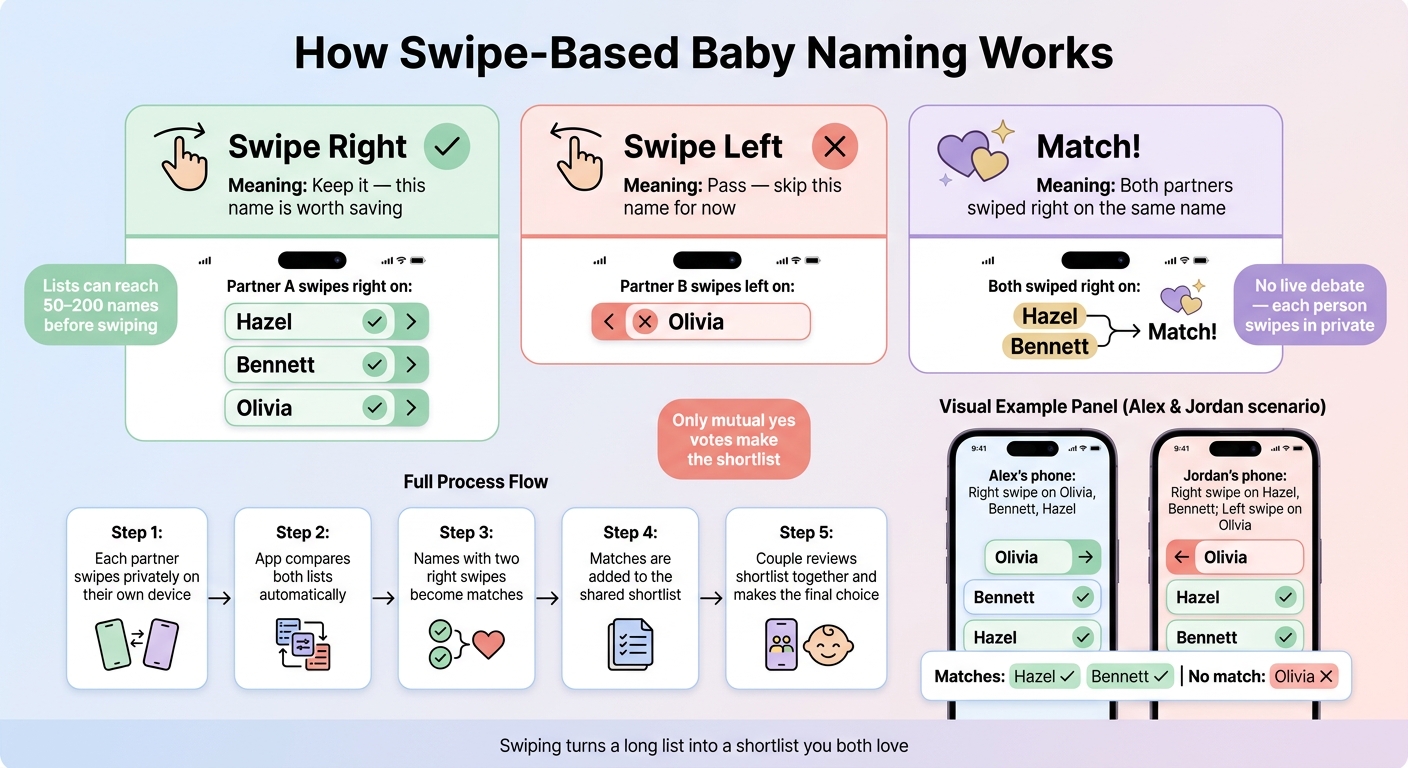
How Swipe-Based Baby Naming Works: Right, Left & Match Explained
Once both partners swipe on their own, the app compares both lists for them. Each name shows up as a card, and the app logs every swipe as it happens.
What swipe right, swipe left, and match mean
Swipe right means keep it. Swipe left means pass. A match means both partners swiped right on the same name.
When that happens, the app puts the name on the shared shortlist. Here’s how partners agree on a name in practice.
An example of 2 partners using a baby-name app
Picture two partners, Alex and Jordan, each swiping through name cards on their own phones. Alex swipes right on Olivia, Bennett, and Hazel. Jordan swipes right on Hazel and Bennett, but swipes left on Olivia because it feels too popular. When the app compares their choices, Olivia only has one right swipe, so it stays off the shared list. Hazel and Bennett each have two right swipes, so they become matches. The app adds Hazel and Bennett to the shared shortlist for meaning, spelling, and fit with the last name.
That shared shortlist gives the couple a clear place to start when it’s time to make the final call.
Why swiping in private helps couples compare choices
Private swiping keeps each pick separate at first. That matters because the shared shortlist only includes names that got two real yes votes.
In plain English: no nudging, no talking someone into a name too soon, and less back-and-forth before each person has had a chance to react on their own.
How NameHatch turns swipes into a shared shortlist
Once you get past the basics, NameHatch makes the swipe flow a lot more useful with filters, match alerts, and a shared shortlist. It takes a simple left-or-right action and turns it into something couples can actually use together.
Set preferences and see names that fit better
Before you swipe a single name, NameHatch lets you set filters that shape what shows up. Standard filters include Most Popular, Classic, Modern, Soft, and Strong. Optional filters can narrow the pool even more.
That step matters because it cuts down the list before swiping starts. A couple that likes soft, modern names will get a very different batch from a couple drawn to classic or mythical picks. With less noise, it’s easier to make decisions and move faster.
How partner matching and real-time alerts work
Each partner swipes on their own, based on their own preferences. When both partners swipe right, NameHatch adds the name to the shared shortlist and notifies both users.
Real-time alerts let both partners know when a match shows up. The shared shortlist updates on its own, so couples can check their overlap without having to debate every single name in the moment.
Why AI suggestions can save time for busy parents-to-be
Those matches also show the app what both partners tend to like. As both partners swipe, NameHatch uses swipe patterns to surface names that better match both partners' preferences. Over time, the shortlist becomes more focused on names that fit both people’s taste.
Conclusion: Why swiping helps with baby-name decisions
When both partners swipe on names on their own, the app highlights the names they both picked. That’s the whole point of swiping: it takes two private yes-or-no reactions and turns them into one shared shortlist. Once you have that shortlist, the conversation changes. Instead of debating every name, you’re comparing names you both already like.
Swiping helps because it turns a big decision into small, fast private choices, then shows only the overlap. A good way to start is with a short solo swiping session. After that, sit down together and review your matches.
Main points to remember
- Swipe right = yes, this name is worth keeping.
- Swipe left = no, this one isn't for us.
- Match = both partners chose the same name, so it goes on the shared shortlist.
- NameHatch turns individual swipes into a shared shortlist.
- The value is a shorter, agreed-on list of names you both like.
The end result is a shorter list both parents can trust.
FAQs
What if we hardly match on any names?
If you barely match on any names, treat the process like something you’re figuring out together - not a contest. Use NameHatch’s style filters, like Classic, Modern, or Mythical, to narrow the list and steer it toward what each of you likes.
As you keep swiping, the app’s AI learns from each person’s picks and gets better at suggesting names. Looking back at your individual likes also helps it adjust and spot areas where your tastes overlap a bit more.
Can swiping make baby-name decisions less stressful?
Yes. Swiping can make baby-name choices feel less stressful because it turns the process into something shared and interactive, not another thing to argue about.
Each partner swipes on names on their own, and the app flags the ones you both like while sharpening its suggestions based on your preferences. So instead of doing a bunch of manual comparisons or going back and forth over every name, you get a shorter list and a lot less friction.
When should we review our shared shortlist together?
Any time. Your shared shortlist stays organized and easy for both partners to check whenever you want.
It updates in real time as each of you swipes on names, so you can look over your mutual favorites whenever you're ready to narrow things down or make the final call.