If you’re searching for a Tinder-style baby-name app, you’re looking for a way to swipe through names, save the ones you like, and see which ones your partner likes too. NameHatch uses that format for baby-name discovery, with shared matches, personalized suggestions, and filters. The swipes help you build a shortlist; they don’t make the final choice for you. The interaction is similar to the left-or-right format of Tinder, applied to baby names.
Main Points:
- Swipe right to save a name and left to pass.
- NameHatch lets partners compare separate choices through shared matches and a shortlist.
- AI suggestions and style filters help you explore names by preference.
- The $0 trial includes limited swipes and basic filters, limited access to Likes, Matches, and Sessions, and no unlimited favorites; paid plans include unlimited swipes and favorites.
Is there a Tinder for baby names?
Swipe-based baby-name apps turn browsing into quick left-or-right choices: keep a name you like, pass on one you don’t, and compare your favorites with another parent’s. NameHatch is one option in this format. A mutual match gives you a starting shortlist, not a decision about what your child must be called.
That distinction can help when you’re working through baby-name disagreements. After a match, talk about how a name sounds, its meaning, and whether it feels right for your family. For ideas on keeping that conversation manageable, see this guide to naming your baby without stress.
Other swipe-based baby-name apps to consider
Compare how partners share choices, what name information is available, and which devices the app lists.
| App | How it supports discovery |
|---|---|
| NameHatch | Swipe separately and get a shared match when you both like a name; explore with AI-powered suggestions and personalized preferences. |
| BabyName — Find It Together | Apple’s App Store listing describes partner connection by shareable link or AirDrop and lists the app for iPhone/iOS; Google Play lists it for Android. The store listings say its 30,000+ names include meanings and origins. |
| CharliesNames | Made for couples to swipe and see shared likes; offers preference and country-popularity filters, plus meanings and origins for almost every name. |
| Kinder | Supports swipe-and-match and group swiping with up to four co-parents; its listing includes name meanings, origins, and pronunciation, and says the app is free with in-app purchases. |
| The Bump Baby Name Matcher | The page says you can swipe through names, pair your account with someone special, and discover the names you both like; it prompts visitors to start on mobile. |
| Baby Names by BabyCenter | Lets partners connect, swipe to rate names, and match on names they both like. Its name generator includes filters for meaning and origin. |
What Is NameHatch and How Does It Work?
NameHatch is a baby-name app built around swiping and partner matching. You can explore names on your own or invite your partner; when you both like a name, NameHatch adds it to your shared matches. AI-powered suggestions and filters give you ways to explore beyond a long list of names.
The Swipe-Based System
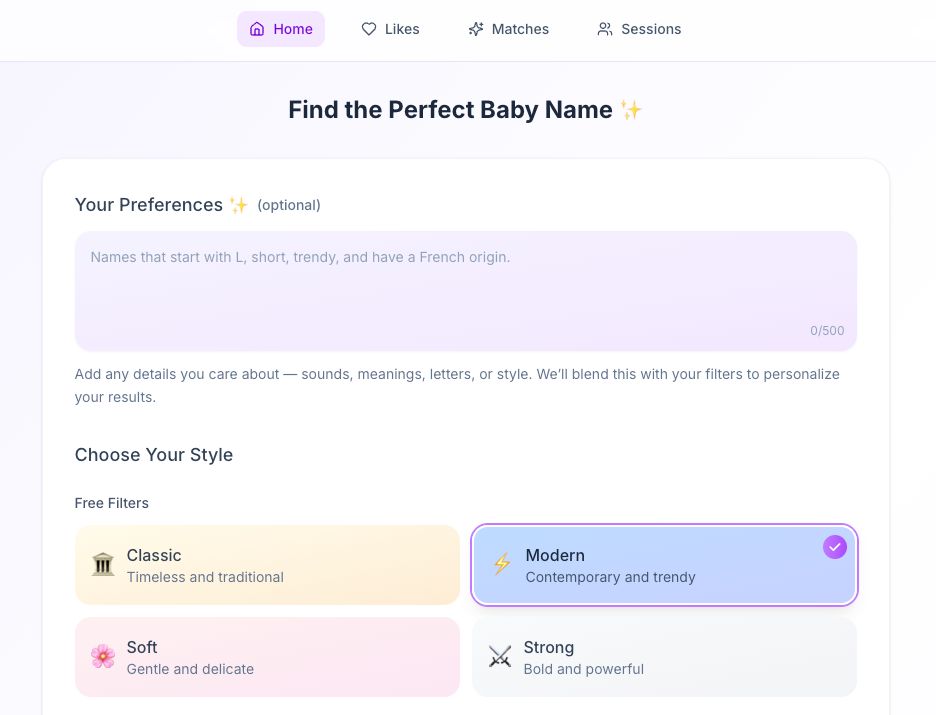
In NameHatch, each name appears as a choice: swipe right to save it or left to skip it. Your right swipes build your own Likes list; if you and your partner both like the same name, the app adds it to your shared Matches. That makes the swipe a quick first pass through possibilities, whether you’re browsing alone or making choices before comparing them. A match helps you gather candidates; you still decide which ones to discuss or keep.
Partner Syncing for Working Together
You and your partner can make choices separately; you don’t have to be in the same place or swipe at the same time. When you both like the same name, NameHatch sends a Partner Match Alert and adds it to the shared shortlist. That can help you focus on options you both chose before talking them through. For other ways to find a baby name both partners agree on, use the shortlist as a prompt for a conversation, not as a substitute for one.
Free and No Ads: A Clean Experience for Parents
NameHatch offers a $0 Free Trial with limited swipes and basic filters, limited access to Likes, Matches, and Sessions, and no unlimited favorites. Paid plans add unlimited swipes and favorites, premium filters, and full access to Likes, Matches, and Sessions. NameHatch’s plans describe an ad-free experience. As of November 2026, the listed options are $12 per user as a one-time payment for six months, or Premium Monthly at $3 per user. See the current NameHatch plans for up-to-date prices and details.
| Plan | Price per user | Included access |
|---|---|---|
| Free Trial | $0 | Limited swipes and basic filters; limited access to Likes, Matches, and Sessions; favorites are not unlimited |
| Pay Once for 6 Months | $12, one-time | Unlimited swipes and favorites, premium filters, and full access to Likes, Matches, and Sessions |
| Premium Monthly | $3 per month | Unlimited swipes and favorites, premium filters, and full access to Likes, Matches, and Sessions |
Choose the trial to see whether the swipe-and-match approach suits you before paying. If you want to build a longer shortlist or use premium filters, compare the six-month and monthly options with how long you expect to use the app. You can start a NameHatch free trial when you’re ready.
Main Points of NameHatch
NameHatch brings name discovery, personal preferences, and shared choices into one place. The features that matter most depend on whether you want help finding new names, organizing your likes, or comparing them with your partner.
Unique Filters for Searching Names
NameHatch’s Smart Style Filters help you explore names by feel, including Classic, Modern, Soft, and Strong styles. Its themed filters include Nature-Inspired, Mythological, Vintage, and Totally Unique; the app also offers options such as Global and Rare Name Vibes, plus ways to narrow choices by culture, gender, and uniqueness. NameHatch’s free trial includes basic filters, while paid plans add premium filters. If you’re still sorting out what style you like, the baby-name style planner can help you describe it. For more ideas, browse rare baby names.
AI-Driven Name Picks
NameHatch uses AI to suggest names based on your style and preferences, giving you another route to options beyond the ones you already know. Treat those suggestions as possibilities to consider rather than a promise that every swipe will produce a closer fit. Check the meanings and background that matter to you with the baby-name heritage finder and meaning finder.
Tools to Keep Track of Faves
With NameHatch, swipe right to add a name to Likes and swipe left to pass. If your partner likes the same name, the Partner Match Alert adds it to Matches; Sessions keep your past swipes available to revisit. This separates the names you saved individually from the ones you both chose. NameHatch’s paid plans include unlimited favorites, and you can remove names as your shortlist changes. If you want a process that starts with a shared list instead of browsing one name at a time, this guide explains a more collaborative approach to baby-name lists.
Why Going Free and No Ads is Key for Parents
NameHatch is ad-free, so ads do not interrupt you while you browse names. Some parents may prefer that for a personal decision, but an ad-free experience does not by itself describe an app’s privacy practices. If data handling matters to you, read NameHatch’s privacy information as well. The free trial also has limits, so check what is included before relying on it for a longer search.
If you’re deciding whether a swipe-based approach fits your family, compare it with other ways to make the choice. You can read about a baby-name app alternative for couples, revisit this guide to finding your perfect baby name, or explore ideas for what to do when you can’t agree on baby names.
How to Begin with NameHatch
You can try NameHatch on your own first, then invite your partner when you’re ready to compare choices. The key is to use the app to collect possibilities and leave time to discuss the names that stand out.
Making Your Profile and Likes
Start by choosing the kinds of names you want to see. You can explore styles such as Classic, Modern, Soft, or Strong, then narrow the options with other preferences. If your preferences change as you browse, update them and treat the shortlist as a working set of ideas rather than a fixed answer.
Joining with Your Mate
Invite your partner to join NameHatch so each of you can swipe separately. When both of you like a name, look at the match together and talk about what appeals to each of you. This helps you surface shared choices without needing to browse at the same time.
Keeping Your Top List
NameHatch keeps your shared list available so you can revisit it on your devices. Remove names that no longer fit, make a note of why you saved a favorite, or share a name with someone whose opinion you want. Then review the shorter list together in stages: check how each name sounds with your surname, whether you both like its meaning, and whether it has a family or cultural connection you want to keep. Revisit the remaining matches after you have had time to think.
End: Naming Your Baby Made Simple with NameHatch
Use NameHatch if the swipe format helps you and your partner find shared possibilities. Start with the free trial, compare its limits with the paid options if you need more swipes or filters, and treat each match as an invitation to talk—not as the final answer. For more ways to find the right name, explore these baby-name app features that matter, baby-name resources for expecting couples, ways to swipe your way to a shortlist, and collaborative baby-naming tools.
“I had no idea naming would be so hard, especially for a boy. Other baby name apps felt outdated, confusing, and pushy with upgrades that didn't even make sense. So we built NameHatch to help couples build a better name list, discover hidden gems, and land on a name they love, confidently.” – Jeremy, Founder & New Dad, NameHatch
FAQs
How does NameHatch’s swipe feature help in picking a baby name?
NameHatch lets you swipe right to save a name or left to pass. If you and your partner both like the same name, NameHatch adds it to your shared matches. You can then review the shortlist and discuss the names together.