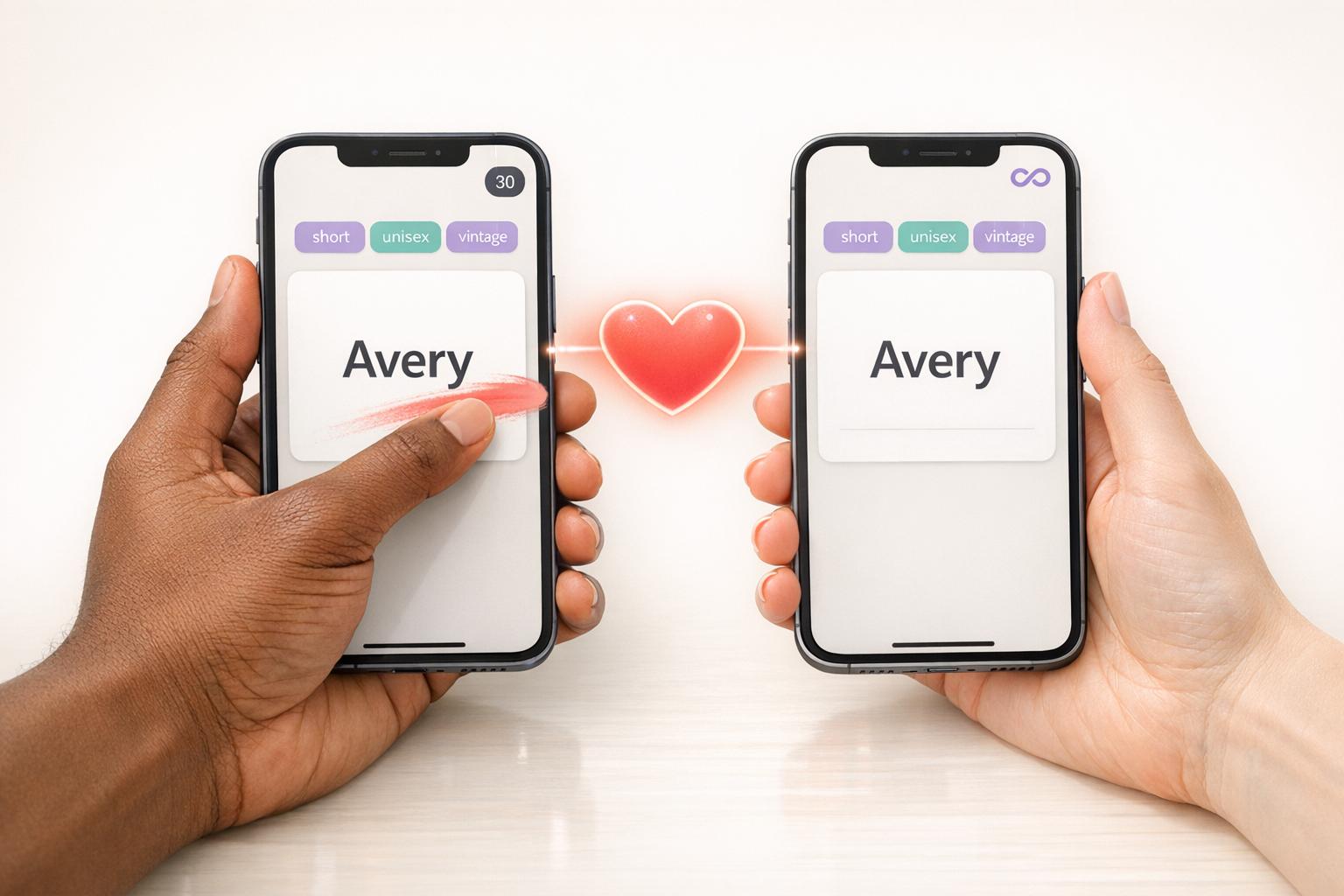
Choosing a baby name can be overwhelming, but apps like NameHatch and Kinder aim to simplify the process with swipe-based systems for couples. Both apps allow partners to independently swipe on names they like, creating shared shortlists when there’s a match. However, they differ in features, usability, and pricing.
Key Differences:
- NameHatch offers AI-powered name suggestions, advanced filters, and works on both desktop and mobile. It’s ad-free, with clear pricing: $7/month or $29 for six months.
- Kinder provides basic swipe features, optional name sets for purchase, and is mobile-only. The free version includes ads, and extra name collections cost $0.99 each.
Quick Comparison:
| Feature | NameHatch | Kinder |
|---|---|---|
| Platform | Mobile + Desktop | Mobile Only |
| Ads | No | Yes |
| AI Suggestions | Yes | No |
| Filters | Advanced (e.g., style, vibe) | Basic (gender, length) |
| Pricing | $7/month or $29/6 months | Free with optional add-ons |
| Partner Sync | Real-time matching | Code-based connection |
If you value AI-driven personalization, a clean interface, and desktop compatibility, NameHatch is the better choice. For a simpler, free option, Kinder may suffice but lacks advanced features.
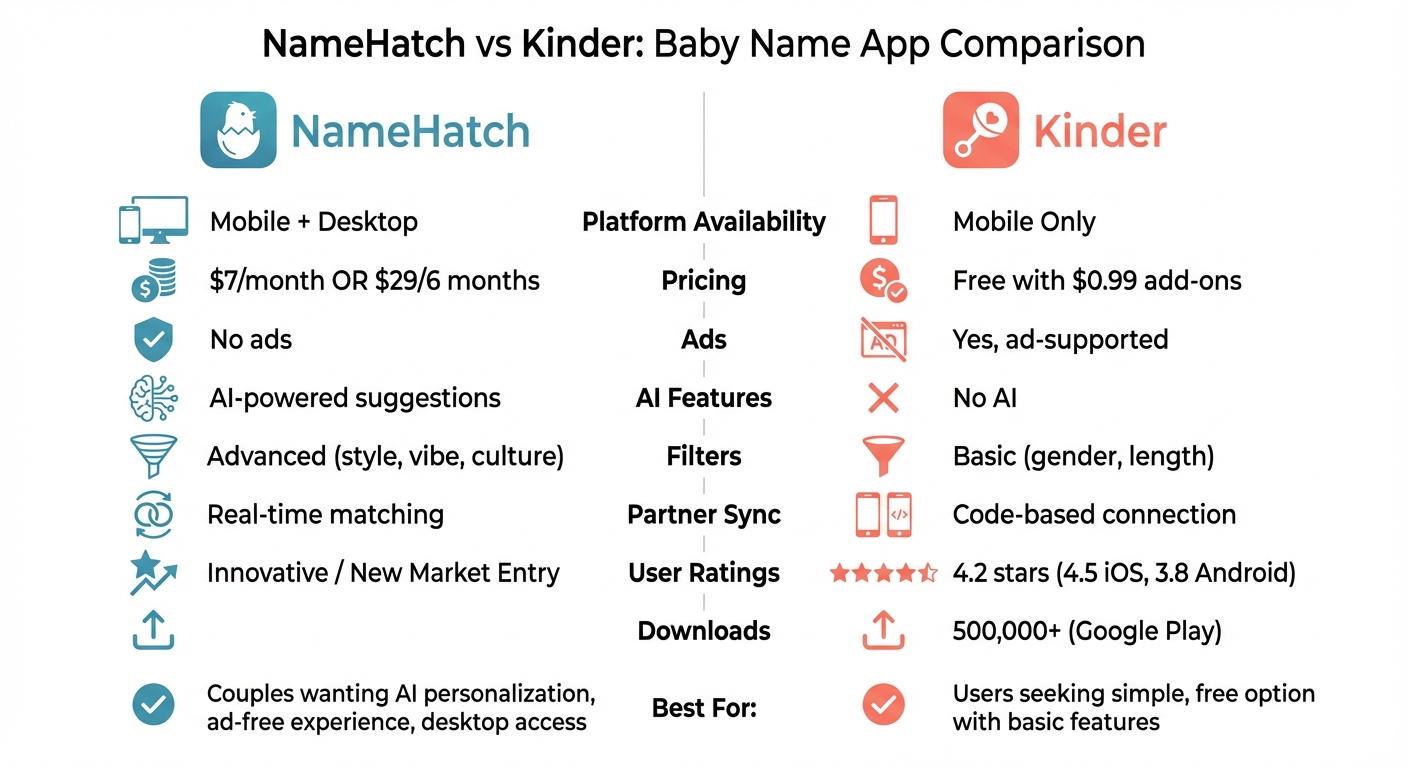
NameHatch vs Kinder Baby Name App Comparison Chart
NameHatch Overview
NameHatch gives couples an easy and engaging way to find the perfect baby name together. It uses a swipe-based system, similar to Tinder: both partners swipe right on names they like, and when there's a match, the app instantly notifies you and adds the name to a shared list.
What makes NameHatch stand out is its AI-driven personalization. Instead of endlessly scrolling through alphabetical name lists, you can describe your ideal name in your own words. The AI then generates suggestions tailored to your preferences. To make the search even easier, the app offers filters like Most Popular, Classic, Modern, Soft, or Strong, helping you quickly zero in on names that match your style.
NameHatch is accessible on both mobile and desktop browsers, with no need to download an app. Whether you're browsing names on your phone during a coffee break or using your laptop at home, the clean, ad-free interface ensures a smooth and distraction-free experience.
Key Features of NameHatch
NameHatch is packed with tools designed to simplify and enhance the baby name search process. Its swipe-based system allows you to quickly sort through thousands of names - swipe right to save, swipe left to skip. The app syncs in real time with your partner, so when both of you like the same name, you’ll get an instant Partner Match Alert.
Free users can access basic filters, such as gender and popularity, while premium users unlock advanced options like Nature-Inspired, Global, Mythology, and Vintage collections. These are perfect for couples looking for something a little different. Additional tools include:
- Baby Name Initials Matcher: Check how first and middle names sound with your last name.
- Trend Analyzer: See if a name is gaining or losing popularity.
- Meaning Finder: Learn the origin, meaning, and emotional tone of any name.
These features make NameHatch a comprehensive tool for finding a name that feels just right.
Pricing and Plans
NameHatch keeps things simple with a clear and upfront pricing structure. The Free plan ($0/month) offers 30 swipes, basic filters, and limited access to likes, matches, and sessions - perfect for trying out the app.
For more flexibility, the Premium Monthly plan ($7/month) gives you unlimited swipes and favorites, full access to matches and sessions, and advanced filters. If you’re planning to use the app over a longer period, the Premium 6-Month plan ($29 one-time payment) saves you 30% compared to monthly billing and includes all premium features, plus priority support.
With flat pricing and no hidden fees, NameHatch makes it easy to budget while offering a stress-free way to find the perfect name.
sbb-itb-f13f980
Kinder Overview
Kinder takes a swipe-based approach to baby name selection, making it a fun and interactive experience for partners. The app works like this: swipe right to save a name or left to dismiss it. With a library of 20,000 names from a variety of origins and styles, there’s no shortage of options for couples to explore.
Couples can connect through a code or link, and when both partners swipe right on the same name, it gets added to a shared shortlist. This list updates every 30 seconds, keeping things dynamic and collaborative.
Exclusively available on iOS and Android, Kinder has already been downloaded over 500,000 times from the Google Play Store alone. The app’s creator, Krijn Haasnoot, designed the swipe mechanism to make the process intuitive and enjoyable.
The free version includes a single name set based on location. For those wanting more variety, specialized collections - like Mythology, nationality-based sets, or themed lists like Pokémon - can be purchased individually for $0.99 or as part of a $4.99 bundle that unlocks for both partners.
Here’s what makes Kinder stand out in the baby name search process.
Key Features of Kinder
Kinder offers several filters to help narrow down name options, including gender (boy, girl, or unisex), starting letter, and maximum name length. It also includes a “home base” where you can manually add your own name suggestions for your partner to review.
However, the app doesn’t display name meanings or origins on the swipe cards. While this keeps the interface clean, some users find themselves needing to research names externally after creating their match list. On the plus side, Kinder supports 23 languages - including Arabic, Dutch, Japanese, and Swedish - making it accessible to a wide range of users.
The private swiping feature ensures that each partner’s preferences are considered without the risk of one person vetoing names outright. This approach encourages open conversations and helps create a focused shortlist for discussion.
Ratings and User Feedback
Kinder boasts an overall rating of 4.2 stars across platforms, with 4.5 out of 5 on the Apple App Store (1,800 ratings) and 3.8 out of 5 on Google Play (over 3,100 reviews). Many users describe the app as “fun,” “addictive,” and an excellent starting point for discovering unique baby name ideas.
Ashland Hendrix from Rookie Moms praised the app, saying: “Kinder is free, it’s fun and it truly is a great tool to use when selecting your baby’s name; two thumbs up!”.
That said, some users have noted a few drawbacks. Common complaints include the lack of name meanings and origins, occasional syncing issues where matches may disappear, and frustrations with the paywall. For example, some users report being unable to view their matches once they’ve exhausted the free name options.
Feature Comparison: NameHatch vs Kinder
Comparison Table: Features and Functionality
Both apps rely on swipe-based interfaces, but there's a key distinction in accessibility: NameHatch works across both mobile and desktop, while Kinder is limited to mobile devices only. This cross-platform support gives NameHatch users more flexibility.
When it comes to personalization, NameHatch takes the lead. It uses AI to suggest names tailored to your preferences. You can even describe your ideal name, and the app will generate custom recommendations. It also includes Smart Style Filters such as Classic, Modern, Soft, and Strong, along with themed collections like Nature, Mythology, and vintage names. In contrast, Kinder offers a more basic approach, relying on a traditional library of names. To expand beyond its standard collection, users need to purchase additional "name sets", typically priced under $1 each.
| Feature | NameHatch | Kinder |
|---|---|---|
| Platform | Mobile + Desktop | Mobile Only |
| AI Suggestions | Yes, personalized AI picks | No |
| Ads | No (Ad-free) | Yes (Ad-supported) |
| Filters | Vibe, culture, gender, uniqueness | Basic filters with optional name sets |
| Partner Sync | Real-time matching and sessions | Partner matching |
| Name Database | Rare, vintage, and AI-generated | Thousands of names in library |
Another notable difference is how the apps handle ads. NameHatch is completely ad-free, while Kinder's free version includes ads. For couples who prefer uninterrupted browsing, this could be a major factor.
These differences also influence how partners interact during the naming process.
Collaborative Features for Couples
Both apps allow partners to swipe independently, with mutual selections forming a shared shortlist. However, NameHatch takes collaboration a step further with features like real-time syncing through "Join Sessions." It even sends Partner Match Alerts the moment both partners swipe right on the same name. Kinder, on the other hand, uses a simpler code-based connection system for partner matching.
These collaborative tools shape the overall experience, with NameHatch focusing on making the decision process as smooth and enjoyable as possible.
Usability and User Experience
Ease of Use and Interface
Both NameHatch and Kinder rely on a swipe-based system - swipe right to save a name, swipe left to skip. This setup feels natural and easy to pick up, even for first-time users. NameHatch works on any browser, loading instantly on any device. Its clean, ad-free design ensures users stay focused on browsing names without distractions. With smart filters, finding the right name becomes quicker and more efficient. These thoughtful design elements complement its features for seamless partner collaboration. On the other hand, Kinder includes ads in its interface, which can sometimes disrupt the user experience. Some users have also reported occasional freezing issues. However, the app's design remains straightforward and adapts well across devices.
Mobile and Desktop Compatibility
NameHatch offers flexibility by allowing users to switch between mobile and desktop without losing their progress. Kinder, however, is restricted to mobile platforms, which may feel limiting for those who prefer using a desktop.
Pros and Cons Table
| App | Pros | Cons |
|---|---|---|
| NameHatch | Works on both mobile and desktop; ad-free; AI-powered suggestions; clean and user-friendly design | Free version limits users to 30 swipes |
| Kinder | Easy-to-use swipe interface; simple layout; partner collaboration supported | Mobile-only; ad-supported; occasional freezing issues; smaller name selection |
Pricing and Value for Money
Cost Comparison Table
NameHatch and Kinder both offer tiered pricing, but their approaches differ significantly. NameHatch provides three straightforward options: a free plan with 30 swipes, a $7/month premium plan, and a six-month plan for $29 (offering a 30% discount). On the other hand, Kinder uses a freemium model with in-app purchases for specialized name sets, typically priced at about $0.99 each.
| Feature | NameHatch | Kinder |
|---|---|---|
| Free Tier | $0 (30 swipes, basic filters) | $0 (unlimited basic swipes) |
| Premium Monthly | $7/month (unlimited swipes, advanced filters) | N/A |
| Premium 6-Month | $29 one-time (30% savings) | N/A |
| Additional Costs | None | ~$0.99 per name set |
| Ads | No | Yes |
| Platform | Mobile + Desktop | Mobile Only |
Assessing Value for Features
The pricing comparison shows clear distinctions between the two platforms. NameHatch stands out with its ad-free environment and a premium experience. The $7/month plan unlocks unlimited swipes, advanced filters (including AI-powered suggestions), and access across both mobile and desktop platforms. For those looking to save, the $29 six-month plan offers the best deal, combining affordability with a rich set of features.
Kinder, while offering unlimited free swipes, relies heavily on in-app purchases, which can make costs unpredictable over time. Its free version is also limited to mobile-only access, which may feel restrictive for users who prefer flexibility or additional features.
For couples prioritizing a distraction-free interface, real-time match notifications, and deeper customization options, NameHatch’s pricing structure provides greater value, even with a higher upfront cost. The platform’s focus on delivering a seamless and personalized naming experience sets it apart from Kinder’s more basic, ad-supported model.
Which Baby Name App is Better?
Final Verdict
NameHatch shines as a baby-naming app that prioritizes collaboration, personalization, and ease of use. Its AI-driven recommendations are tailored to match specific styles and backgrounds, making the naming process feel more thoughtful and less overwhelming. Unique tools like the Baby Name Initials Matcher and the Trend Analyzer go beyond simple name suggestions, offering deeper insights to help parents make meaningful choices.
One standout feature is the Partner Match Alert, which focuses on mutual preferences to create a shared shortlist. This feature simplifies decision-making, saving time for busy parents-to-be. NameHatch also works seamlessly across desktop and mobile browsers, eliminating the need to download an app. This flexibility allows one partner to browse on a laptop while the other swipes on their phone, ensuring a smooth and ad-free experience.
When it comes to pricing, NameHatch offers a straightforward plan: $7 per month or $29 for six months. This flat fee provides access to all features without ads, making it a convenient and predictable option for parents who want a hassle-free experience.
Key Takeaways
NameHatch stands out for its thoughtful features and user-friendly design. Its Smart Style Filters - including Classic, Modern, Soft, and Strong - let users refine their searches based on personal preferences. Curated collections, such as nature-inspired or vintage names, add an extra layer of customization. Tools like the Baby Name Compatibility Checker and Meaning Finder give insight into how names sound together and their emotional significance, helping couples make informed decisions. Finally, the browser-based platform with real-time syncing ensures effortless collaboration, making it an ideal choice for parents on the go.
FAQs
How does AI help me find better baby names?
AI can make finding the perfect baby name easier by analyzing your preferences - whether it's style, origin, meaning, or pronunciation - and offering personalized suggestions. It cuts down the time spent searching by generating unique and relevant options that align with your values. Plus, tools like smart filters and partner collaboration features streamline the decision-making process, making it more efficient and enjoyable for your family.
Can my partner and I use it on different devices?
NameHatch lets you and your partner use the app on separate devices without any hassle. It syncs across devices, so both of you can swipe, review, and match names independently. With real-time updates and a shared favorites list, collaborating becomes effortless - no matter where you are.
What happens when we both like the same name?
When both partners agree on a name in NameHatch, the app marks it as a mutual match. This feature helps make the decision-making process smoother by focusing attention on names you both like. By spotlighting shared favorites, NameHatch promotes teamwork and makes it easier to narrow down your choices.